
Download Teachable Machine – Free No‑Code Machine Learning Tool
Overview
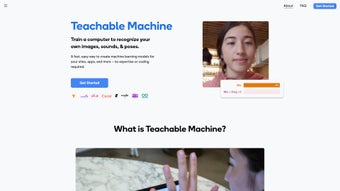
Teachable Machine is a web‑based, no‑code machine‑learning platform created by Google’s Creative Lab that lets anyone—from schoolchildren experimenting with AI to seasoned makers building interactive installations—design custom models in a matter of minutes. The entire workflow happens inside a modern browser, which means there is no heavy SDK to install, no Python environment to configure, and no complex dependency chain to manage. Users simply choose a project type (image, audio, or pose), capture examples using a webcam, microphone, or file upload, label each class, and click “Train Model.” The underlying TensorFlow.js engine performs the heavy lifting on the client side, often delivering a trained model in under a minute for modest datasets.
Because all processing can stay on the device, the platform offers a privacy‑first experience: images, sounds, and pose data never leave the user’s computer unless the user explicitly exports them. Once a model is trained, it can be exported in a variety of formats—TensorFlow.js for web integration, TensorFlow Lite for mobile, or even an Arduino sketch for embedded hardware. This flexibility makes Teachable Machine a bridge between creative prototyping and real‑world deployment.
The tool also includes a rich library of tutorials, community‑driven templates, and step‑by‑step guides that walk newcomers through building everything from a simple “rock‑paper‑scissors” classifier to a full‑featured interactive game controller. By eliminating the need to write code, Teachable Machine lowers the barrier to entry for AI, empowering educators to introduce machine‑learning concepts in the classroom and enabling hobbyists to prototype intelligent experiences without spending weeks learning complex frameworks.
Key Features and Benefits
- Zero‑code model creation: Build image, audio, and pose classifiers using a drag‑and‑drop interface that requires no programming knowledge.
- Instant training & testing: Models are trained in seconds and can be evaluated live with webcam, microphone, or file uploads, providing immediate visual feedback.
- On‑device privacy: All data stays in the browser by default, ensuring that personal images or audio never leave the user’s device.
- Cross‑platform export options: Export to TensorFlow.js, TensorFlow Lite, ML5.js, or generate an Arduino sketch, allowing models to run on web pages, mobile apps, or microcontrollers.
- Arduino integration: Generate ready‑to‑upload C++ code that lets physical hardware react to model predictions in real time.
- Live data capture: Capture examples directly from webcam, microphone, or pose detector without the need for pre‑recorded files.
- Responsive design: Works seamlessly on desktops, laptops, tablets, and smartphones across Windows, macOS, Linux, Android, and iOS.
- Extensive tutorials and templates: Over 30 step‑by‑step guides and community‑contributed project templates help users start quickly.
- Free core functionality: All essential features are available at no cost; premium extensions are optional and clearly labeled.
- Open‑source components: Core libraries are open source, allowing developers to extend or customize the platform.
Pros
- Completely free for core features; no hidden subscription fees.
- No programming knowledge required; ideal for educators and beginners.
- Fast training times thanks to optimized TensorFlow.js back‑end.
- Privacy‑first design: all processing can stay on the user’s device.
- Rich export options covering web, mobile, and embedded hardware.
- Cross‑platform compatibility across major operating systems and browsers.
- Extensive library of tutorials and community templates.
- Supports three data modalities (image, audio, pose) in a single interface.
- Integrates smoothly with Arduino for physical computing projects.
- Open‑source components allow developers to extend functionality.
Cons
- Limited to relatively small datasets; large‑scale training requires offline TensorFlow.
- Advanced hyperparameter tuning is not exposed to the user.
- Exported models are optimized for inference, not for further training.
- Requires a modern browser with WebGL support; older devices may struggle.
- Audio classification is less robust in noisy environments without preprocessing.
- No built‑in version control for model iterations; users must manage files manually.
Installation & Usage Guide
Because Teachable Machine runs entirely in the browser, there is no traditional installation process. To get started, simply open a modern browser—Chrome, Edge, Safari, or Firefox—and navigate to the official site at teachablemachine.withgoogle.com. The platform automatically loads the required WebGL and WebAssembly components, so the first visit may take a few seconds while the libraries cache.
Once on the homepage, you’ll be presented with three project types: Image Project, Audio Project, and Pose Project. Choose the type that matches your creative goal, then follow these detailed steps:
- Collect examples: Click “Add class” to create labeled categories (e.g., “Cat”, “Dog”). Use the webcam, microphone, or file upload to capture at least 20‑30 samples per class. The more diverse the examples, the better the model’s accuracy.
- Label and organize: Give each class a clear, descriptive name. The platform uses these labels to generate prediction outputs, so consistent naming helps during integration.
- Train the model: Press the “Train Model” button. TensorFlow.js automatically selects an appropriate architecture based on data size and type. A progress bar, loss curve, and accuracy metric keep you informed in real time.
- Test live: After training, experiment by pointing the webcam at new objects, speaking new sounds, or moving into new poses. The prediction confidence is displayed instantly, allowing you to fine‑tune by adding more examples if needed.
- Export your model: Click “Export Model” to download a ZIP file containing JavaScript files, a TensorFlow Lite model, or an Arduino sketch. You can also copy a CDN link for direct embedding into a website without hosting files yourself.
Compatibility: The application runs on any device that supports WebGL 2.0 or higher, which includes Windows 10/11, macOS Catalina and later, major Linux distributions, Android 8+ and iOS 13+. For offline use, simply host the exported files on a local server or bundle them into a native app using frameworks such as React Native, Capacitor, or Electron.
When integrating an exported TensorFlow.js model, the typical usage pattern looks like this:
import * as tf from '@tensorflow/tfjs';
import '@tensorflow/tfjs-backend-webgl';
const model = await tf.loadLayersModel('model.json');
const prediction = await model.predict(inputTensor).data();
This snippet demonstrates how a model can be loaded and used to generate predictions from an input tensor. Detailed usage instructions are included in the auto‑generated README.md that accompanies every export, ensuring a smooth transition from prototype to production.
Frequently Asked Questions
Is Teachable Machine really free to use?
Yes. The core web application and all basic features are completely free. Google does not charge for training, exporting, or using the models you create. Premium extensions or custom enterprise solutions may have a cost, but for most users the free version is fully functional.
Can I use Teachable Machine offline?
Yes. After you export a model, you can host it locally or bundle it inside a desktop or mobile app. The training itself, however, requires an internet connection to load the initial TensorFlow.js libraries, though the model can be trained offline if you cache those resources beforehand.
What file formats are available for export?
You can export models as TensorFlow.js (a model.json with binary weight files), TensorFlow Lite (.tflite) for mobile, ML5.js compatible files, or as an Arduino sketch that embeds the model in C++ code. Additionally, a simple .zip containing a demo HTML page is provided for quick web testing.
Does the tool work on mobile browsers?
Absolutely. Teachable Machine is responsive and works on Android Chrome and iOS Safari. The webcam or microphone access is handled through standard HTML5 APIs, so you can capture data directly from your phone’s camera or mic. Performance may vary on older devices.
How secure is my data during training?
By default, all data stays in your browser memory and never leaves your device unless you explicitly export it. This on‑device processing ensures that images, sounds, or pose data are not uploaded to external servers, making it suitable for privacy‑sensitive projects.
Can I integrate a Teachable Machine model with existing JavaScript frameworks?
Yes. The exported TensorFlow.js model can be imported into any JavaScript environment, including React, Vue, Angular, or plain vanilla JS. The accompanying README provides code snippets for common setups, and the model’s API follows standard TensorFlow.js conventions.
Conclusion & Call to Action
Teachable Machine delivers a unique blend of accessibility, privacy, and cross‑platform flexibility that makes it stand out in the crowded landscape of AI prototyping tools. Whether you are a teacher introducing students to the fundamentals of machine learning, a maker building an interactive robot, or a developer needing a quick proof‑of‑concept, the platform lets you create, test, and deploy models without ever writing a line of code. Its instant training, on‑device processing, and seamless export paths to web, mobile, and Arduino empower creators to move from idea to functional prototype in minutes rather than weeks.
If you’re ready to experiment with image, sound, or pose classification, visit Teachable Machine now, start a new project, and download your first model for free. Unlock the power of machine learning without the steep learning curve—download today and transform your creative concepts into intelligent applications!
- Free core features, no coding required
- Instant training & real‑time testing
- Cross‑platform export (Web, Mobile, Arduino)
- Limited dataset size for optimal performance
- Advanced model customization is unavailable



.png)



